
AI Software Development in 2026: The Rise of AI-Native Systems

The rules of building software have changed. Quietly at first — then all at once. AI software development has moved from a buzzword to the actual backbone of how products get built in 2026. Today, <mark>95% of software engineers use AI tools at least weekly</mark>, and 75% apply them to more than half of their total work. That number was close to zero just four years ago.
This is not a trend. It is a structural shift. And understanding it — whether you are a student, a freelancer, or a small business owner — is now table stakes.

What Is AI Software Development?
AI software development is the practice of using artificial intelligence tools, models, and agents to plan, write, test, debug, and deploy software. Instead of a developer typing every line of code manually, AI systems generate code suggestions, automate repetitive tasks, and increasingly handle full workflows without constant human input.
In short: AI software development is how modern teams build faster, smarter, and with fewer errors — by making AI an active participant in the coding process rather than just a reference tool.
How Does AI Software Development Work?
AI-assisted development follows a clear loop: Input → Model → Output → Feedback. A developer provides context — a prompt, an existing codebase, a bug report, or a feature spec. The AI model processes that input, generates code or suggestions, and returns output. The developer reviews it, accepts or modifies it, and that feedback teaches the model what works.
Here is how the loop operates in practice:
Input — Developer writes a natural language prompt or highlights existing code
Model — A large language model (like those from OpenAI, Google, or Anthropic) processes the input
Output — Code, tests, documentation, or a plan is generated
Feedback — The developer accepts, edits, or rejects the output, improving future suggestions
This loop repeats thousands of times a day. Over time, the system learns the patterns, preferences, and architecture of a project — making each suggestion sharper than the last.
What Is AI-Native Software Development and Why Does It Matter?
AI-native development is not just using AI as a helper inside a traditional workflow. It is building the entire development process around AI from the start — where AI agents plan, build, test, and deploy with humans guiding strategy and reviewing outcomes.
The difference between these three approaches is significant:
Dimension | Traditional Coding | AI-Assisted Development | AI-Native Development |
Who writes code? | Developer writes everything | Developer writes with AI suggestions | AI agents write; developer directs |
Speed | Weeks to months per feature | Days to weeks | Hours to days |
Primary developer skill | Syntax, algorithms | Prompting + review | Orchestration + architecture |
Error handling | Manual debugging | AI flags issues | Agents auto-fix and re-test |
Workflow trigger | Developer initiates every step | Developer prompts AI per task | Agents act on goals autonomously |
Tooling example | VS Code, Git | GitHub Copilot, Cursor | Claude Code, multi-agent systems |
Cost of iteration | High | Moderate | Low |
Why does it matter? Because Gartner predicts that by the end of 2026, 90% of software engineers will shift from hands-on coding to AI process orchestration. The companies that treat AI as native infrastructure — not a plugin — are pulling ahead fast.

How Is AI Used in the Software Development Lifecycle (SDLC)?
How does AI help in planning and requirement analysis?
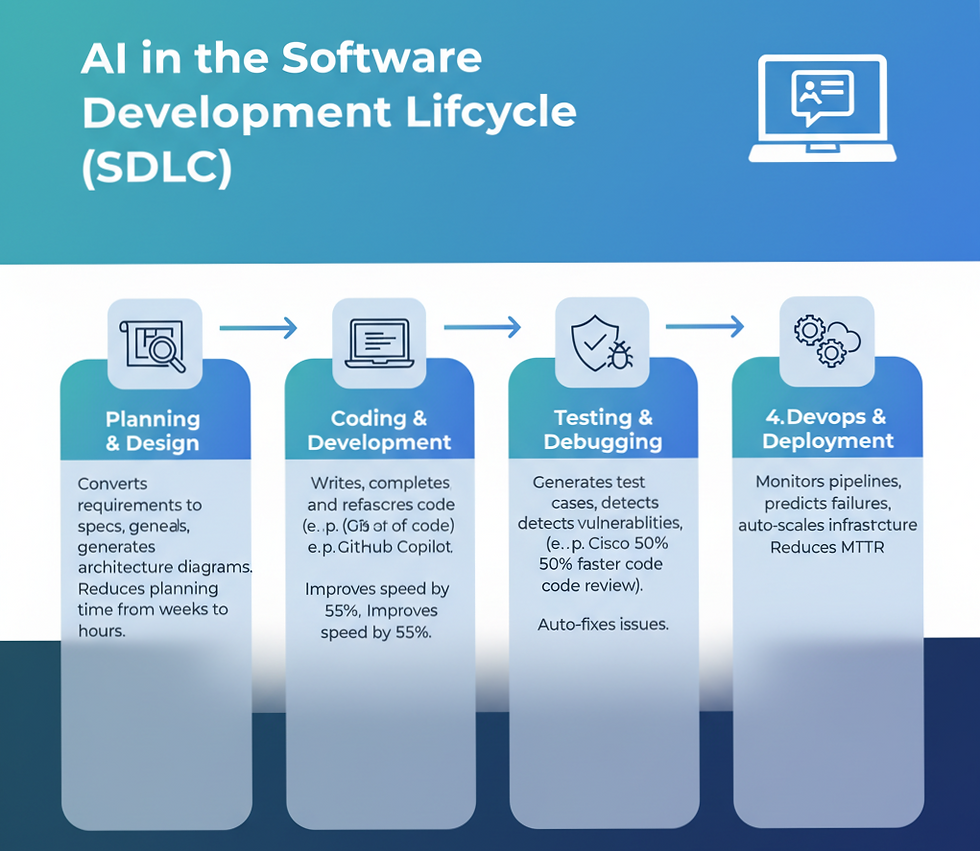
AI helps teams convert vague business requirements into structured technical specifications, user stories, and architecture diagrams within minutes. Tools powered by OpenAI and Google models can analyze similar past projects and flag risks before a single line of code is written.
Before AI, requirement analysis could take two to three weeks. Now, small teams use AI to generate draft specifications in hours, review them with stakeholders the same day, and begin sprints the next morning. AI in SDLC planning reduces requirement ambiguity — one of the most common causes of failed software projects.
How does AI improve coding and development?
AI tools write, complete, refactor, and explain code in real time. GitHub Copilot, for example, now writes nearly 46% of all code for active users — almost half of every project. Developers using these tools complete tasks 55% faster while maintaining or improving code quality.
Beyond speed, AI catches logical errors that manual reviews miss. It suggests idiomatic code patterns, generates documentation inline, and handles boilerplate that used to drain hours from developer schedules. The result: engineers spend more time solving hard architectural problems and less time on repetitive syntax.
How does AI automate testing and debugging?
AI-driven testing tools generate test cases automatically from code context, detect edge cases that humans overlook, and run regression suites without manual setup. GitHub Copilot Autofix, for instance, identifies security vulnerabilities and provides suggested patches directly in the code editor.
Cisco deployed OpenAI Codex-powered tools across its entire engineering team and saw a 50% reduction in code review times. Duolingo reported a 67% drop in median code review turnaround and a 70% increase in pull request volume. These are not marginal gains. They are structural productivity shifts that change how teams are sized and managed.
How does AI optimize DevOps and deployment?
In DevOps, AI monitors pipelines, predicts deployment failures before they happen, and auto-scales infrastructure based on real-time usage signals. Microsoft and Google have both integrated intelligent anomaly detection into their cloud platforms, making it possible to catch performance regressions hours before users notice them.
AI-native CI/CD pipelines can now trigger rollbacks, adjust resource allocation, and generate incident reports autonomously. This reduces mean-time-to-recovery (MTTR) dramatically and frees DevOps engineers to focus on architecture rather than firefighting.
What Are the Benefits of AI Software Development?
Speed, cost, accuracy, and scalability — these four benefits define why every serious technology team is adopting AI-driven software development in 2026.
Speed: Development cycles that took months now take weeks. Some MVPs are being built in days. Teams using AI tools report time-to-pull-request dropping from 9.6 days to 2.4 days on average.
Cost: Fewer manual hours per feature means lower labor cost. Low-code and no-code platforms enhanced by AI reduce app delivery time by up to 90%, democratizing software creation for non-technical teams.
Accuracy: OpenAI Codex achieves 85% accuracy on software engineering benchmarks. Accenture reported an 84% increase in successful builds after deploying AI coding tools across its development teams.
Scalability: Small teams can now build products that used to require large engineering departments. AI agents handle the volume; humans handle the judgment. By 2026, over 75% of new applications are being built using low-code or no-code technologies powered by AI.
What Are Real-World Use Cases of AI Software Development?
AI-driven software development is active across every major industry right now.
SaaS: Vertical AI grew 400% year-over-year and tripled to $3.5 billion in 2025. AI-native SaaS products are replacing point tools that relied solely on human-written logic, offering adaptive features that improve with each user interaction.
Fintech: Financial software teams use AI in SDLC to generate compliance-aware code, automate audit trail documentation, and detect anomalies in transaction processing pipelines faster than any rule-based system could.
Healthcare: Healthcare generates 30% of the world's data, and most of it is unstructured. AI-native development teams are building systems that process clinical notes, imaging reports, and insurance documentation at scale — tasks legacy code simply was not designed for.
E-commerce: Recommendation engines, dynamic pricing algorithms, and fraud detection systems are now built and maintained using AI-native applications that adapt their own logic based on shifting consumer behavior. Human developers set the parameters. AI handles the tuning.
What Are the Best AI Software Development Tools in 2026?
The leading AI coding tools in 2026 are GitHub Copilot, OpenAI Codex, Claude Code, and Cursor. Each serves a distinct workflow:
Tool | Best For | Key Strength | Accuracy (SWE-Bench) |
GitHub Copilot | Daily IDE coding | Plug-and-play, broadest IDE support | ~90% suggestions accepted |
OpenAI Codex | Complex, multi-language tasks | Autonomous engineering, sandbox execution | 74.9% on SWE-Bench Verified |
Claude Code | Large codebase understanding | 1M token context, deep repo intelligence | 80.8% on SWE-Bench Verified |
Cursor | IDE-based visual editing | Supermaven autocomplete, 72% acceptance | Multi-file composer workflows |
Google AI (Gemini) | Enterprise cloud workflows | Tight GCP integration, multimodal inputs | Growing rapidly on benchmarks |
GitHub Copilot has 4.7 million paid subscribers as of January 2026, a 75% year-over-year increase, and is deployed at 90% of Fortune 100 companies. The AI coding tools market reached $7.37 billion in 2025 and is projected to hit $23.97 billion by 2030.
What Is an AI-Native Development Workflow?
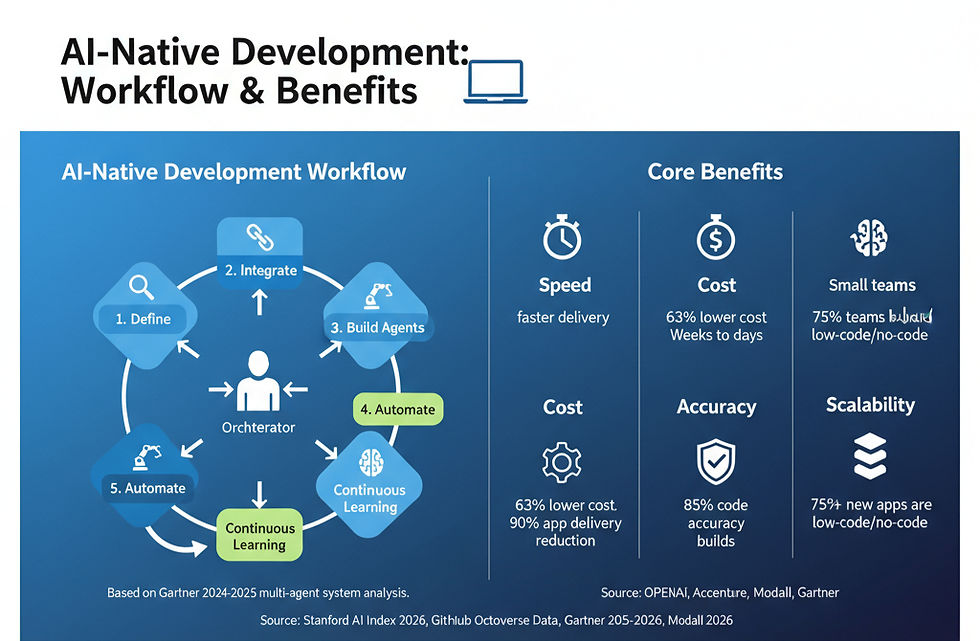
An AI-native development workflow replaces the traditional sprint model with a continuous, agent-driven process. Here is a step-by-step framework:
Step 1 — Define: Translate business goals into structured prompts or specs. Use AI to validate completeness and flag ambiguity before work begins.
Step 2 — Integrate: Connect AI tools into your IDE, CI/CD pipeline, and version control. Ensure agents have access to repository history and documentation.
Step 3 — Build Agents: Deploy specialized AI agents for distinct tasks — one for front-end generation, one for API logic, one for database schema optimization. Gartner reported a 1,445% surge in multi-agent system inquiries from Q1 2024 to Q2 2025.
Step 4 — Automate: Let agents handle testing, code review, deployment checks, and documentation. Humans review outcomes, not inputs.
Step 5 — Continuous Learning: Feed agent feedback loops with production data. AI systems improve their suggestions based on what passes review, what gets rejected, and what causes bugs in production.
What Are the Challenges of AI Software Development?
Four challenges stand out as the most significant barriers to confident AI adoption in software teams.
Hallucinations: AI models sometimes generate plausible-looking code that is logically wrong or syntactically broken. Developers must still review every suggestion critically. 29.1% of Copilot-generated Python code contains potential security weaknesses — a figure that demands ongoing human oversight, not blind acceptance.
Security: AI tools trained on public repositories can inadvertently suggest patterns with known vulnerabilities. Governance frameworks and code scanning tools are now essential companions to any AI coding workflow.
Over-dependence: Junior developers who rely entirely on AI for code generation may not develop the foundational skills needed to debug complex systems or design resilient architectures. Employment among software developers aged 22 to 25 has fallen nearly 20% since 2022, partly attributed to AI tools reducing the need for entry-level output.
Cost: While AI reduces labor costs over time, the tooling itself carries a price. Enterprise deployments of tools like GitHub Copilot and OpenAI Codex can run into significant per-seat costs. Additionally, 72% of CIOs report they are barely breaking even on their AI investments — a reminder that adoption without strategy delivers poor returns.
Is AI Replacing Software Developers?
No — but it is reshaping who does what, and which skills matter most.
The evidence is nuanced. Entry-level developer demand has dropped by approximately 40% at companies that have seriously deployed AI tools. At the same time, AI/ML engineer salaries have risen to an average of $206,000 — up $50,000 in a single year. AI skills now command a 56% salary premium across technical roles.
Senior developers are not being replaced. They are being amplified. The ability to orchestrate AI agents, evaluate their outputs critically, and design systems that leverage autonomous development — those skills are entering a golden era. What is shrinking is the demand for developers who only write routine, template-level code.
The Stanford HAI 2026 AI Index puts it plainly: mid-career and senior developer positions have held steady or grown, while entry-level roles have contracted. This is a reshaping of the profession, not its elimination.
Decision Framework: When to Use AI vs. Traditional Methods
Use AI-native development when:
You need to ship an MVP quickly with a small team
Your project involves large volumes of repetitive code (CRUD operations, API wrappers)
You require continuous testing and rapid iteration
You are building in a well-documented language or framework (Python, JavaScript, TypeScript)
Stick closer to traditional development when:
The codebase involves highly proprietary, undocumented systems
Security and compliance requirements restrict AI tool usage
The domain is highly specialized with little public training data (e.g., niche hardware systems)
The team lacks the oversight skills to review AI-generated output reliably
What Is the Future of AI Software Development?
Autonomous coding and multi-agent systems are the next frontier — and they are arriving faster than most predicted.
In 2025, SWE-Bench Verified scores — the industry benchmark for AI software engineering capability — jumped from around 60% to nearly 100%. That is not incremental progress. That is a capability step-change in under twelve months.
Agentic AI is growing at a 119% compound annual growth rate. By 2028, Gartner predicts that 40% of software development team members will come from non-traditional technical backgrounds, enabled by AI tools that allow domain experts — doctors, lawyers, logistics managers — to contribute directly to production software.
Multi-agent orchestration is becoming standard. GitHub's Agent HQ, announced in February 2026, allows developers to run Claude, Codex, and Copilot simultaneously on the same task — each reasoning differently and contributing distinct perspectives to the solution.
The future is not a single AI assistant. It is a coordinated team of specialized agents, directed by a human who understands the goal, reviews the work, and owns the outcome.
How Can You Start with AI Software Development?
Here is a practical roadmap for beginners in 2026:
Week 1–2: Pick one tool and use it daily. Start with GitHub Copilot Free (available to verified students at no cost) or the free tier of Cursor. Use it for real tasks — not just experiments.
Month 1: Learn prompt engineering. The quality of AI output is directly tied to the quality of your input. Clear, specific, context-rich prompts produce dramatically better results than vague ones.
Month 2: Understand one core language well. Python and JavaScript are the most AI-friendly languages due to their large public training datasets. Do not skip fundamentals — you need to evaluate AI output, not just accept it.
Month 3: Build something complete. Use an AI-assisted workflow to build a small but real project from spec to deployment. Document what AI generated and what you modified.
Month 4+: Study AI orchestration. Learn how to chain agents, build RAG (Retrieval-Augmented Generation) systems, and design workflows where multiple AI tools collaborate. This is where the market is heading and where salaries are growing.
What programming languages are used most? Python dominates AI development for its ML ecosystem. JavaScript and TypeScript lead for web applications. Go and Rust are growing rapidly for performance-critical AI infrastructure.
Mini Case Study: Before vs. After AI in a Small Software Project
Project: A three-person startup building a SaaS analytics dashboard.
Before AI tools (2022 approach):
Timeline: 14 weeks from spec to beta launch
Team effort: ~2,400 developer hours across three roles
Key bottlenecks: Manual test writing (3 weeks), API documentation (2 weeks), bug triage (ongoing)
Cost: ~$38,000 in developer time
After AI-native workflow (2026 approach):
Timeline: 5 weeks from spec to beta launch
Team effort: ~800 developer hours, same three-person team
AI contribution: Auto-generated test suites, inline documentation, first-draft API logic, CI/CD pipeline setup
Cost: ~$14,000 in developer time + ~$600 in AI tooling subscriptions
Outcome: 64% faster delivery, 63% lower cost, with higher test coverage than the manual approach
The team did not shrink. Their output capacity tripled.
FAQs About AI Software Development
What is AI software development in simple terms?
It is the use of AI tools to help write, test, and deploy software. Instead of coding everything manually, developers use AI to generate code, catch bugs, and automate repetitive tasks — making the whole process faster and more accurate.
Can AI build software on its own?
Not entirely — not yet. AI agents can handle significant portions of a codebase autonomously, but they still require human oversight for architectural decisions, security reviews, and quality judgment. The current model is best described as human-directed autonomous development.
Which AI tools are best for coding?
In 2026, the leading tools are GitHub Copilot (best for everyday IDE use), Claude Code (best for large codebase tasks), OpenAI Codex (best for autonomous complex engineering), and Cursor (best for visual IDE workflows). Most professional developers use two or more simultaneously.
Is AI software development hard to learn?
The coding basics are accessible — especially with AI assistance. What requires real investment is learning to evaluate AI-generated code critically, structure effective prompts, and design systems where AI agents work together reliably. Domain knowledge remains essential.
What programming languages are used in AI development?
Python leads for machine learning and AI tooling. JavaScript and TypeScript dominate web applications. Go and Rust are growing for infrastructure and performance-critical systems. OpenAI Codex supports over 12 programming languages.
How accurate is AI-generated code?
It depends on the tool and task. OpenAI Codex achieves 74.9% accuracy on SWE-Bench Verified benchmarks. Claude Code scores 80.8% on the same benchmark. For routine tasks, AI code is often production-ready after minor review. For complex logic, human judgment remains essential.
What are AI-native applications?
AI-native applications are software systems designed from the ground up with AI as a core component — not an add-on. They adapt their own behavior based on data, use ML models for decision-making, and often include AI agents that operate autonomously within defined parameters.
References
This article is backed by authoritative sources and research. All statistics cited are drawn from the following verified publications:
Stanford HAI — 2026 AI Index Report The most comprehensive annual analysis of AI's technical progress, economic impact, and workforce effects. 🔗 https://hai.stanford.edu/news/inside-the-ai-index-12-takeaways-from-the-2026-report
GitHub Copilot Official Statistics & Octoverse Data Primary source for GitHub Copilot user numbers, productivity gains, enterprise adoption, and developer satisfaction data. 🔗 https://github.com/features/copilot
Gartner — AI in Software Engineering Predictions (2025–2026) Source for predictions on developer role shifts, AI agent adoption forecasts, and enterprise IT spending. 🔗 https://www.gartner.com/en/information-technology
The Pragmatic Engineer — AI Tooling Survey 2026 Primary survey data from nearly 1,000 professional software engineers on AI tool adoption, usage frequency, and workflow integration. 🔗 https://newsletter.pragmaticengineer.com/p/ai-tooling-2026
Modall — AI in Software Development: 25+ Trends & Statistics (2026) Aggregated statistics from McKinsey, JetBrains, Stack Overflow, Deloitte, and GitHub on AI development adoption and productivity outcomes. 🔗 https://modall.ca/blog/ai-in-software-development-trends-statistics
OpenAI Codex Statistics — Quantumrun Research (2026) Verified performance benchmarks, enterprise deployment case studies, and market sizing data for OpenAI Codex. 🔗 https://www.quantumrun.com/consulting/openai-codex-statistics/
© 2026 Fourfold AI Research Team | fourfoldai.com | For permissions and republishing inquiries, contact the editorial team.



Comments